Multifamily Window Treatments: How to Specify Them
November 1, 2026
Professional Installation Benefits for Custom Window Treatments
November 3, 2026
The fastest way to control glare in a home office is to change three things in order: where your screen sits relative to the window, how the window is covered, and how bright the other lights in the room are. Most people jump straight to a darker shade and end up working in a cave. A better fix keeps daylight in the room and removes the harsh contrast between a bright window and a dimmer screen.
This guide walks through that order, explains which window treatments suit which exposure (with Tampa Bay’s strong sun in mind), and shows how to handle a small office where the desk cannot move.
TL;DR
- Turn your screen so it sits at a right angle to the window, and keep your desk at least 3 feet from the glass.
- Use a light-filtering or sheer layer when you want daylight, and add a second layer you can close for the hardest hours of sun.
- Match the window treatment to the exposure: west and south windows in Florida usually need the most control.
- Cut overhead glare with diffusers, dimmers or a shaded task lamp, and set screen brightness to match the room instead of fighting the window.
- If the desk cannot move, adjustable coverings and a movable monitor arm do most of the work.
Why a bright window makes a screen hard to read
Glare is not simply too much light. It is light in the wrong place. OSHA explains that bright lights can wash out the images on a display, and that windows and overhead fixtures can bounce light off the monitor surface. The same page notes that glare can lead to eye strain, fatigue and headaches, and can even pull you into awkward postures as you lean or tilt to see around a reflection.
There is a second problem that has nothing to do with reflections: contrast. Colorado State University points out that a bright window next to a darker screen forces your eyes to keep readjusting, which contributes to fatigue and headaches. So you can have a perfectly matte monitor and still feel worn out by 2 p.m. if the window behind or beside it is blazing.
That is why we think of glare control as a design problem rather than a shopping problem. You are balancing the brightness across the whole field of view.

Two kinds of glare to diagnose first
Before you buy anything, spend one afternoon watching your desk.
- Reflected glare: you see a mirror image of the window or a ceiling fixture on the screen. Fix this with desk angle, shading and lamp placement.
- Direct glare or contrast: you squint at the window itself, or the screen looks dim next to it. Fix this with window coverings that soften and even out the light.
Most home offices have both, at different hours. Note the time of day each one appears, because that tells you which treatment you need.
Start with the desk, not the shade
The cheapest fix is free. OSHA advises placing the face of the display at a right angle to windows and light sources. In practice, that means the window is at your side, not in front of you and not directly behind you.
Distance matters too. UC Davis recommends sitting at least 3 feet away from windows to help reduce glare.
Also look at what is behind the monitor. Colorado State University says the area behind your screen should be a relatively solid, evenly lit background. A bright window directly behind the display, or a busy bookshelf with a lamp glowing over it, works against you.
A quick placement checklist:
- Stand where your head will be and look at the screen when it is off. Any bright shape you can see in the black glass will be there when it is on.
- Rotate the desk or screen until the reflections disappear.
- Check at morning, midday and late afternoon. Florida sun moves fast, and a desk that works at 10 a.m. can fail at 4 p.m.
Window treatments that cut glare and keep the light
Once the desk is as good as it can be, the window covering does the rest. OSHA’s guidance is simple: use blinds or drapes to reduce glare from windows. Colorado State University adds a useful refinement: when you want some daylight but the window is still too bright, choose a light-filtering shade rather than a blackout product.
The goal, as the GSA puts it in its daylighting guidance, is uniform, comfortable illumination without large swings in light level across the workspace. That is a good test for any treatment you consider: does the room look evenly lit, or is there a hot stripe across the desk?
Comparing your main options
| Treatment | What it does for glare | Best for | Watch for |
|---|---|---|---|
| Sheer or light-filtering shades | Diffuses sunlight and softens contrast while keeping the room bright | Offices that want natural light all day | May need a second layer on the hottest exposures |
| Roller shades | Clean, flat profile; fabric openness sets how much light and view you keep | Modern offices, tight spaces, motorized setups | Pick the openness to match your exposure |
| Cellular shades | Insulating pockets add light control and help with heat | Rooms that get hot in the afternoon | Fabric choice decides how dim the room becomes |
| Roman shades | Soft, tailored look with adjustable height | Home offices that double as living space | Lined fabrics block more light than unlined ones |
| Draperies layered over sheers | Two independent settings: soft daylight or near-darkness | West and south windows, video calls | Needs enough stackback space beside the window |
| Blinds and shutters | Slat angle redirects light up toward the ceiling | Rooms where you want precise, changing control | Slat angle needs resetting as the sun moves |
Blinds: vertical or horizontal?
OSHA gives a specific rule of thumb: vertical blinds work best on east- and west-facing windows, and horizontal blinds on north- and south-facing windows. The logic is the sun’s path. Low morning and evening sun comes in at a steep side angle that vertical slats can block, while high midday sun is handled well by horizontal slats tilted upward.

Sheer layers: soft light without a dark room
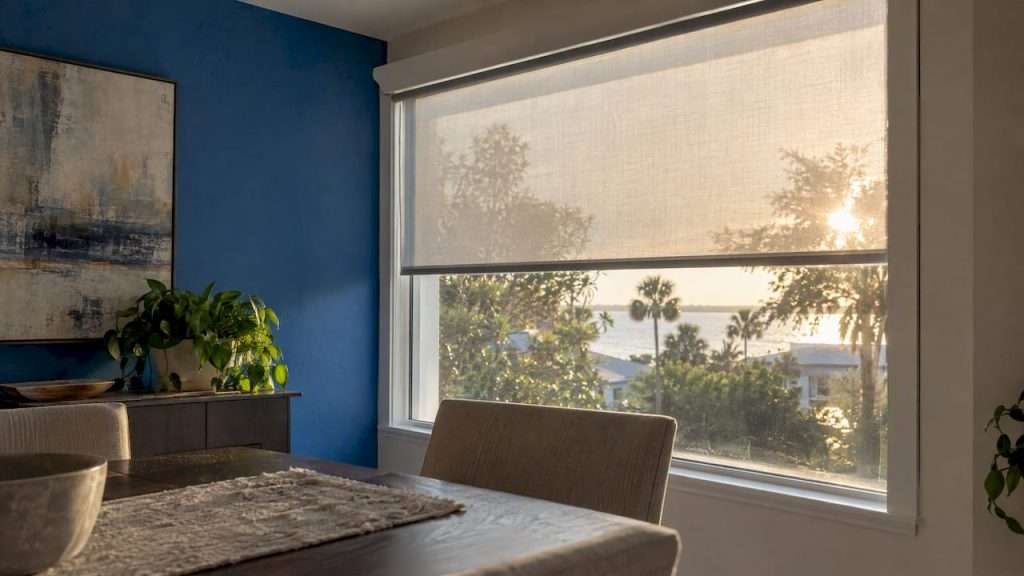
Sheer-style shades diffuse sunlight rather than shutting it out. They are a strong match for a home office because the room stays bright, the view is partly preserved, and the harsh edge of the sun disappears. If you want to see how fabric openness affects the look, we explain it in our guide to sheer shades and soft light. If you do not want to lose the outdoors entirely, our piece on shades that preserve your view covers how to choose a fabric.
Layering for a day that changes
A single treatment is a compromise. A layered one gives you settings. A common home-office combination is a light-filtering shade mounted close to the glass for all-day softening, with draperies on a rod that you close only when low sun hits the screen. Colorado State University’s advice for workstations that cannot be moved is to adjust window coverings as the sun shifts through the day and across seasons. Layers make that adjustment quick instead of annoying, and quick is what determines whether you actually do it.
Motorization is the natural next step. If you will not climb out of your chair to adjust a shade at 3:30 every afternoon, a motorized shade on a schedule or a remote does it for you. You can see what is available on our motorized blinds and shades page.
Match the treatment to your exposure in Tampa Bay
General ergonomic advice is written for offices everywhere. Florida adds intense, high-angle sun for much of the year and long, bright late afternoons.
- West-facing windows are the usual troublemakers: low, hot sun lands right in your eyes and on your screen late in the day. We cover this in detail in our guide to west-facing window glare in Tampa Bay. A tightly woven screening fabric plus a closable drapery layer is a typical answer.
- South-facing windows get strong midday light. Horizontal slat angles, cellular shades or a fabric chosen for UV control handle this well. Our page on UV-blocking shades and zoning by room explains how to choose a fabric for these exposures.
- East-facing windows are bright in the morning and then settle down. A light-filtering shade is often enough, and many people simply raise it after the early sun passes.
- North-facing windows give steady, softer light. Here a sheer layer mostly solves residual contrast without dimming the room.
If your home office has floor-to-ceiling glass, you are managing both glare and visibility from outside. Our article on floor-to-ceiling window privacy covers that combination.
The GSA also notes that effective daylighting can include exterior shading, roof overhangs or glazing technologies to reduce glare while keeping a productive environment. For a covered lanai or a sunny patio office, that is a reminder that outdoor drapery and shades can be part of the plan, not only what hangs inside.
Do not forget the other lights
Window glare gets the attention, but overhead fixtures cause just as many reflections, especially in an office with recessed cans or a ceiling fixture above the desk.
OSHA’s suggestions are practical:
- Reduce excessive overhead light with diffusers. If you have four-bulb fluorescent fixtures and no diffusers or alternatives, removing the middle bulbs is one option the guidance lists.
- Use task lighting for reading and writing rather than brightening the entire room, and keep the brightness around the monitor limited.
- Shield or shade lamps so the light is directed away from your line of sight.
In a home office this usually translates to a dimmer on the overhead light, a shaded lamp to one side of the desk, and no bare bulb in your peripheral view. The same OSHA page gives a general range of 20 to 50 foot-candles for paper tasks, which is why a modest, even level of light is better than a bright room.
Set the screen to the room
UC Davis advises adjusting your screen brightness to match the general brightness of the room. Resist the urge to crank the monitor up to beat the window. Colorado State University specifically cautions against relying on higher brightness to overpower a bright window, because correcting the workstation orientation or controlling the daylight is generally more effective and more comfortable.
A small office, or a desk that cannot move
Plenty of home offices are a corner of a bedroom or a desk wedged under a window. You may not be able to follow the ideal layout, and that is fine. Here is how we would approach it.
- Make the window adjustable. Choose a covering that moves easily and gives you more than one setting: a shade plus a drapery, or blinds with a tilt control.
- Add a movable monitor arm. Colorado State University suggests it as a way to reposition the screen at different times of day when the workstation is fixed.
- Shelter the screen. The California computer user’s guide recommends using a hood where necessary to shield the screen from undesirable lighting. A simple shroud on the monitor does this.
- Control the background. If the window is behind the screen, a sheer that evens out the light matters even more.
- Keep the room bright elsewhere. A dark room with a bright window makes contrast worse. Light-filtering fabrics let the whole room lift together.
What to ask before you order custom window treatments
For a home office, a few questions save regret:
- Which direction does the window face, and when is the glare worst?
- Do you take video calls? If so, a fully dark room looks flat on camera, and you may want soft daylight on your face rather than behind you.
- Do you need privacy from neighbors or the street, or is the goal only glare?
- Will you adjust the treatment by hand every day, or should it be motorized?
- Do you need a view, or is the window mostly a light source?
Our guide to daylight-friendly privacy is useful if privacy and light are both on your list.
Our perspective
After years of fabricating window treatments in our Tampa Bay workroom, we have seen the same mistake repeatedly: someone is bothered by glare, buys a standard blind off the shelf, and ends up closing it all day. The glare is gone, and so is the daylight they wanted in the first place.
We believe a home office window deserves the same planning as the desk. A treatment should be sized to the exact opening, built from a fabric that suits the exposure, and layered so you have settings for morning, midday and late afternoon. Because we fabricate every product onsite, we can control fit, materials and quality, and adjust the design to your budget and practical needs instead of forcing your room into a catalog size.
Our approach is to start with how you work. We look at where the screen sits, which way the window faces, and what you want to keep, whether that is the light, the view or the privacy. Then we design the combination of shades, draperies or motorized controls that does the job, and our team handles measurement, installation and removal of the old treatments.
The Drapery Company
Get a window plan built around your desk
If you would like glare handled without losing your daylight, we can help. We offer in-home consultations, custom design, professional measurement and installation, and removal of old window treatments as a courtesy. You can start with our in-home consultation and installation services, browse our custom window shades, or look at the full range of blinds, shades and shutters. If you manage an office building rather than a home office, our page on commercial window coverings that reduce glare is the better starting point.
FAQ
What is the best window covering for home office glare?
For most home offices, a light-filtering or sheer shade is the best starting point, because it softens the sun while keeping the room bright. On west and south windows, add a second layer such as draperies or a closable shade for the hardest hours of sun. Colorado State University also recommends a light-filtering shade when you want some daylight but the window is still too bright.
Where should my desk be in relation to the window?
Place your screen at a right angle to the window, so the glass is at your side rather than in front of or behind you. Keep the desk at least 3 feet from the window if the room allows it. If you cannot rearrange, use adjustable coverings and a movable monitor arm.
Should I turn my monitor brightness up to fight window glare?
No. Set your screen brightness to match the room instead. Boosting it to compete with a bright window is less effective and less comfortable than controlling the daylight or changing your desk orientation.
Do blinds or shades work better for glare control?
Both work, and the right choice depends on the window. Blinds let you redirect light by changing the slat angle, and OSHA suggests vertical blinds for east- and west-facing windows and horizontal ones for north- and south-facing windows. Shades, especially light-filtering or sheer styles, give a smoother, more even light with fewer moving parts.
Can I control glare without making my office dark?
Yes. Choose fabrics designed to filter light instead of blocking it, layer them so you can open or close each one, and reduce competing glare from overhead fixtures. The aim is even light across the room, not the lowest possible light.
Sources
- OSHA eTools: Computer Workstations, Workstation Environment
- Colorado State University: Lighting Ergonomics
- UC Davis Safety Services: Lighting Ergonomics
- GSA: Lighting, High Performance Building Clearinghouse
- California Department of Human Resources: The Computer User’s Guide to an Ergonomic Workstation