Avoid Edge Light: Woven Wood Shades Made to Measure
September 13, 2026
3%–5% Openness and Pro Help for Floor to Ceiling Window Privacy
September 15, 2026
For most conference rooms, the right default is a motorized roller or dual-roller system that pairs a low-openness solar screen with a separate blackout layer. That combination balances daylight, video performance, and automation better than any single-fabric solution. It controls glare without killing the view, blocks light completely when a presentation demands it, and removes the daily hassle of someone fumbling with a wand or cord before a client call. These systems can be built on-site and installed as a complete package, which matters once you see how many moving parts a “simple” shade actually involves.
TL;DR:
- Dual-roller motorized systems with a solar screen and blackout layer provide flexible daylight control and eliminate manual adjustments during presentations.
- Fabrics with low openness percentages are essential for glare reduction in rooms with frequent video calls, while blackout layers offer complete light blocking for content creation or recording.
- Motorized shades integrated with building automation systems improve meeting efficiency by automatically adjusting for sun movement and supporting scene presets, especially in larger or high windows.
- Proper specification includes defining fabric openness, fire ratings, hardware quality, and ensuring compatibility with existing control protocols to prevent costly mismatches.
- Regular maintenance, safety-compliant cordless operation, and custom fabric or hardware choices help maximize durability, safety, and branding consistency across multiple conference rooms.
What Types of Conference Room Shades Work Best?
The right shade type depends on what happens in the room, not just how the window looks. A boardroom that runs video calls all day has different needs than a huddle space used for internal check-ins.
- Roller shades with solar screen fabric cut glare on monitors and cameras while keeping sightlines to the outside. Openness percentages in the low single digits are standard for screen-heavy rooms, since tighter weaves block more direct light without going fully opaque.
- Blackout roller shades matter when a room doubles as a presentation space or a video studio for recorded content. A single blackout layer, though, forces a choice between total darkness and full daylight with nothing in between.
- Dual-roller systems solve that by mounting a solar screen and a blackout shade on the same headrail, so a room can shift from bright and open to fully dark without swapping hardware. Zoom’s own lighting guidance points to exactly this kind of layered approach, plus side channels, to stop light from leaking around the edges of a blackout shade during a presentation.
- Cellular shades add a layer of insulation and modest sound dampening, which helps in glass-heavy rooms where HVAC costs or hallway noise are a real problem.
- Vertical blinds and venetian blinds suit tall or irregularly shaped windows where a roller system would need excessive drop or unusual mounting.
- Motorization becomes worth the added cost once windows are large, high, or tied into a room’s AV routine. For smaller interior offices, manual shades still get the job done. Switchable glass exists as a premium alternative, but it carries a much higher price tag and can’t be retrofitted as easily as shading.
Commercial specs should also call out fire-rated fabrics (most contract fabrics meet NFPA 701), reinforced headrails rated for daily motorized cycling, and a warranty that covers both fabric and motor components separately, since they tend to fail on different timelines.
Why Glare Control and AV Performance Matter More Than Looks
A conference room’s shading choice affects more than comfort. It directly shapes whether video calls look professional and whether the room actually functions the way it was designed to.
Backlighting from an uncontrolled window washes out faces on camera and forces presenters to fight glare on a shared screen. Lighting designers who specialize in video conferencing recommend controlling daylight as a core part of the AV build, not an afterthought bolted on later, and target a 3:1 contrast ratio between a participant and their background to avoid a silhouette effect on camera.
- Reduced glare means fewer mid-meeting scrambles to reposition laptops or dim lights manually.
- Automated shading tied to a meeting’s start time cuts down on the small, constant support requests IT teams field for “the room doesn’t look right on camera.”
- UV-blocking fabrics protect display finishes, furniture, and branded wall graphics from fading over years of direct sun exposure.
- Privacy fabrics with low openness keep sensitive client conversations from being visible through glass walls in open-plan offices.
Pro Tip: If your building has east or west-facing conference rooms, budget for automation even in smaller spaces. Sun angle shifts fast enough at those exposures that manual shades rarely keep up.
What Should Go in a Conference Room Shade Spec Sheet?
A vague request for “shades for the boardroom” invites mismatched bids. A tighter spec protects the budget and the outcome.
- Define the room’s primary use first. A space built for hybrid video calls needs different fabric openness than a room used mainly for internal meetings with no camera.
- Specify fabric openness percentage and blackout rating separately, and require side-channel or overlap details in writing so light leak isn’t discovered after installation.
- Require motorization protocol compatibility with whatever your building already runs, whether that’s Crestron, AMX, BACnet, or a common wireless standard, plus confirmation the shades support saved scene presets.
- Ask for commercial-grade headrail specs, mounting details, and fire-rating certificates up front rather than assuming they meet code.
- Get warranty terms, lead time, and fabrication scope in writing, including whether fabrication happens on-site or is outsourced to a third party.
Budget shifts most with fabric grade, whether you choose single or dual-roller headrails, the motor type, and how deep the controls integration goes. A basic manual solar screen costs a fraction of a fully integrated dual-roller motorized system with scene presets, so nailing down use case before requesting quotes keeps comparisons apples to apples. The motorized shades page breaks down what drives those cost differences in more detail.
How Does Shade Automation Work With AV Systems?
The real value of motorization shows up when shades stop being an isolated device and become part of the same control system as lighting and displays. Systems integrators describe this as treating shading as one part of a unified meeting-room architecture rather than a separate accessory, so a single “start meeting” command closes shades, adjusts lighting, and wakes the display together, as outlined in Crestron’s case study on total meeting-room control.
- One-touch meeting modes remove the awkward few minutes where someone hunts for the right remote before a call starts, which matters most when a senior executive is the one standing there fumbling.
- Sensor and schedule-based control adjusts shades automatically as the sun moves, which manual operation can’t realistically keep pace with.
- Ask vendors directly about protocol support: Crestron, AMX, BACnet, Zigbee, or RTS each imply different long-term serviceability and how easily the system integrates with future building upgrades.
- Power options matter for retrofit projects. Wired motors are most reliable, battery-powered units simplify installation in finished spaces, and solar rechargers with battery fallback work well where running new wiring isn’t practical.
- Commissioning should include real scene testing, not just installation. That means verifying presets, time-of-day triggers, and fail-safe behavior, plus training staff so the system doesn’t get abandoned in favor of manual overrides within a month.
How Long Does Installation Take and What Should You Budget For?
Conference room shade projects follow a fairly predictable sequence: site survey and measurement, fabric and sample approval, fabrication, installation, then commissioning and staff training.
- Survey and measure, which also identifies power and mounting needs for motorized units.
- Approve fabric and openness samples against actual room lighting conditions, not a swatch under office fluorescents.
- Fabrication, typically two to four weeks for a standard room and longer when dual-roller headrails or custom motorization are involved.
- Installation and commissioning, including scene programming if the shades tie into AV or building automation.
A small conference room with manual or basic motorized shades can be measured, fabricated, and installed within two to four weeks. A large boardroom with dual-roller motorized shades integrated into a building automation system often runs four to eight weeks or longer, mainly because AV and electrical coordination takes time to schedule. Confirm power provisioning and conduit routing early, since electrical work is the most common cause of installation delays.
Maintenance Best Practices and Troubleshooting Common Issues
Shade maintenance in a commercial setting is mostly about consistency, not complexity. Dust and light debris are the most common issue, and a simple vacuum brush attachment or lint roller run along the fabric every few weeks prevents buildup that eventually stains solar screen material.
Motorized components need less attention than most facility managers expect, but they aren’t maintenance-free. Motors should be checked on a service interval recommended by the manufacturer, usually annually, to confirm battery levels (for battery-powered units) or wiring integrity (for hardwired systems). A shade that starts stopping short of its full travel distance or responding slowly to remote commands is often signaling a battery running low or a limit switch that has drifted out of calibration.
Fabric replacement is a separate consideration from motor service. Solar screens exposed to direct, intense sun for years can fade or lose tension before the motor shows any wear, so budgeting for fabric refresh on a longer cycle than motor service keeps the room looking sharp without needing a full system replacement.
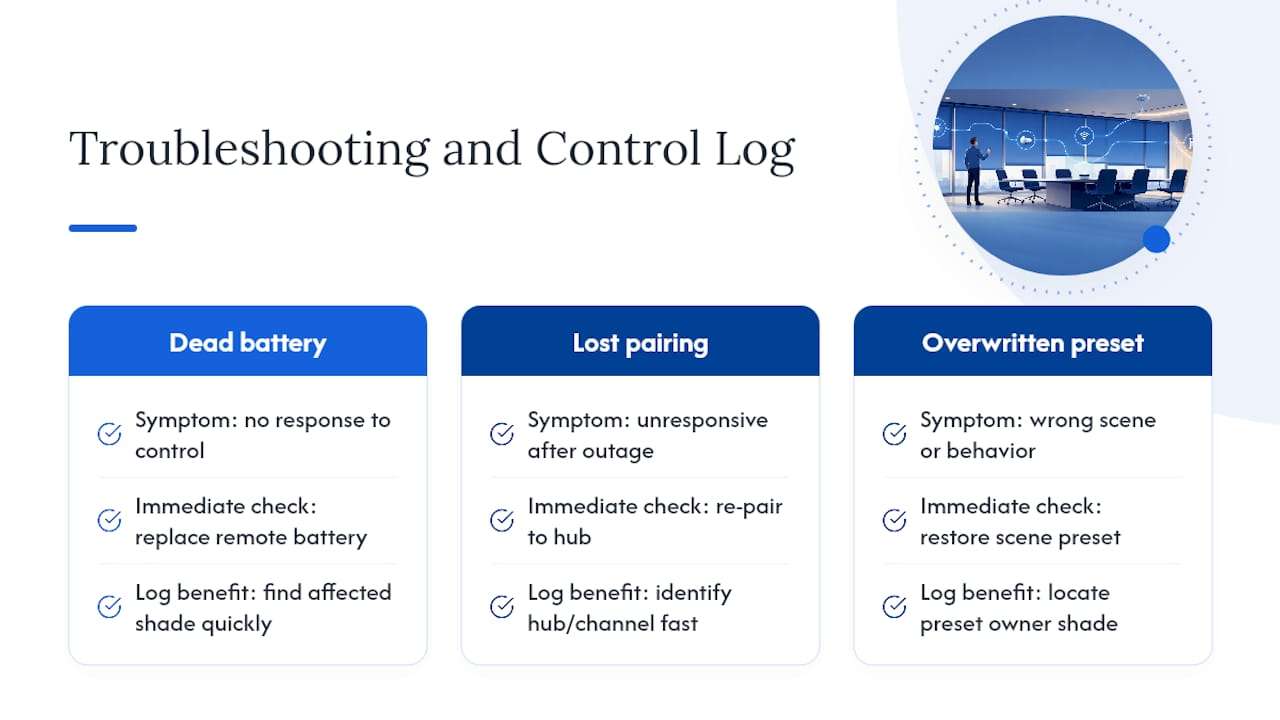
The most common troubleshooting call facility teams field is a shade that won’t respond to a wall switch or app command. Nine times out of ten, that’s either a dead battery in a wireless remote, a shade that’s lost its pairing to the control hub after a power outage, or a scene preset that got overwritten during an unrelated AV update. Keeping a written log of which shades are on which control channel saves real time when troubleshooting a multi-room deployment.
Are Conference Room Shades Safe for Employees and Visitors?
Cordless and motorized operation isn’t just a convenience upgrade. It’s increasingly the expected standard for any commercial or public-facing space, largely because corded shades create a strangulation hazard that building codes and safety organizations have targeted for years.
For office environments, the safety conversation centers less on children (as it does in residential settings) and more on general workplace hazard reduction and ADA-friendly operation. A motorized shade controlled by a wall switch, app, or automated schedule removes dangling cords entirely, which also simplifies compliance in spaces that see young visitors, whether that’s a client’s family touring an office or an employee’s child at a work event.
Commercial-grade shades should carry fire-rated fabric certification appropriate to the building’s occupancy classification, and any exposed wiring for motorized units should be installed to code by a licensed electrician rather than run loosely along baseboards. Cordless cellular and roller shades, along with motorized systems, have become the practical default for commercial specification precisely because they sidestep the safety questions that corded designs raise, while also looking cleaner in a professional space.
What Customization Options Exist for Conference Room Shades?
A conference room doesn’t have to default to beige. Fabric color, weave pattern, and opacity level all affect how a room looks and feels, and increasingly, companies treat window coverings as part of their branding rather than a purely functional afterthought.
Solar screen fabrics come in a range of weave densities and colors, from near-black options that maximize glare control to lighter tones that keep a room feeling open while still cutting UV exposure. Blackout fabrics can be selected to coordinate with wall colors or brand palettes rather than defaulting to stark white or gray. Some companies request subtle branded elements, like a logo woven into a fabric border or a specific corporate color matched precisely across every conference room on a floor, which reinforces a consistent look across multiple offices or locations.
Headrail finishes and valance styles also factor into the overall look, especially in executive boardrooms where the shading system is visible and part of the room’s design statement rather than tucked away. Choosing a fabric and hardware combination that fits both the room’s function and the company’s visual identity is where working with a fabricator who handles custom window treatments pays off, since off-the-shelf options rarely offer this level of choice.
Do Conference Room Shades Support Sustainability Goals?
Shading has a real, measurable role in a building’s energy profile, not just its comfort level. Daylight harvesting strategies, which use light sensors to adjust shading automatically and keep interior illuminance consistent, reduce reliance on artificial lighting and can lower HVAC load by blocking solar heat gain during peak sun hours.
For companies tracking sustainability metrics or working toward LEED-related building goals, automated shading tied to a building automation system is one of the more straightforward upgrades available, since it doesn’t require replacing windows or major structural work. UV-blocking fabrics extend the service life of furniture, flooring, and display technology, which reduces replacement waste over time. Durable, commercial-grade fabrics and headrails also mean a longer product lifespan before the system needs replacing, which matters more for environmental impact than most people assume when comparing cheap versus quality window coverings.
Choosing fabrics from manufacturers with documented environmental certifications, and specifying quality hardware built to last well beyond a typical office lease cycle, are the two levers facility teams have the most control over when sustainability is part of the procurement criteria.
What Warranty and Service Terms Should You Expect?
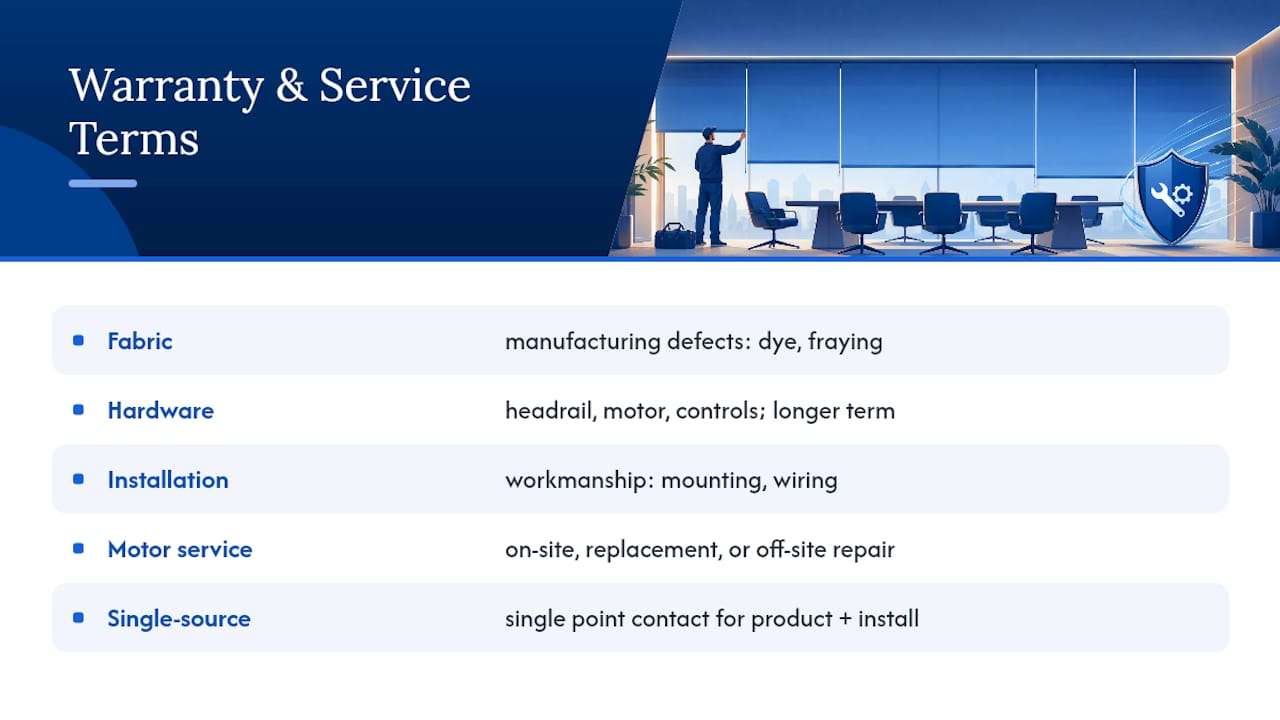
Warranty coverage on conference room shades typically splits into two categories: fabric and hardware. Fabric warranties usually cover manufacturing defects like uneven dye lots or premature fraying, while hardware warranties cover the headrail, motor, and control components separately, often for a longer period since mechanical parts fail differently than fabric wears out.
Motorized systems specifically should come with a service agreement that spells out what happens if a motor fails: whether the vendor sends a technician on-site, ships a replacement unit, or requires the shade to be removed and serviced off-site. That distinction affects downtime, and for a boardroom that hosts client meetings weekly, downtime has a real cost. Ask any vendor directly how quickly they can respond to a motor failure and whether loaner units or expedited replacement parts are part of the service agreement.
Installation warranties are separate from product warranties and cover workmanship, like whether a headrail was mounted level or a motor was wired correctly. A company that fabricates and installs its own products, rather than reselling a manufacturer’s line through a third-party installer, generally has more control over resolving both product and installation issues under one point of contact rather than passing the problem between a manufacturer and an independent installer.
Why a Custom, Installed Solution Beats a Generic Fit
The gap between a shade that fits and one that’s “close enough” shows up the first time a blackout panel leaves a strip of daylight along the edge during a client presentation. Custom measuring and side-channel detailing close that gap; a stock-sized shade almost never does. With extensive experience fabricating on-site, commissioning, not just installation, is treated as the step that actually prevents the recurring support calls a poorly specified system generates.
— The Drapery Company
Ready to Spec Your Conference Room Shades?
If your conference rooms are still running on mismatched mini blinds or shades installed before your last AV upgrade, a custom system solves problems those originals were never built to handle. Every shade is fabricated on-site and the full process is handled directly, from custom measurement and fabric selection through motorization, professional installation, and removal of old window treatments as part of the service.
A first consultation typically starts with a walkthrough of the room, a discussion of how it’s actually used day to day, and sample fabrics evaluated against your real lighting conditions rather than a showroom. From there, you get a detailed quote covering fabric, hardware, and motorization before any fabrication begins. If your boardroom or meeting space needs shades that actually support your AV setup instead of fighting it, request a consultation for your commercial space and get a plan built around your room, not a generic spec sheet.
Sources
Deeper technical guidance on this topic includes lighting and video-conferencing standards from Yealink and LEDucation, systems-integration perspectives from UCToday and CCS Mid Atlantic, and vendor support notes from Zoom.
- Beyond the video call: managing the total meeting-room environment (Crestron case)
- Designing Light for Video Conference (LEDucation 2025)
FAQ
What is the new trend for window coverings in offices?
Motorized, AV-integrated shading is the clearest trend, with shades tied into the same control system as lighting and displays so a room can shift between video call, presentation, and general meeting modes with one command.
How do you block sun glare in an office conference room?
A low-openness solar screen fabric paired with a separate blackout layer handles most glare situations, since it lets you dial in exactly how much daylight a room needs at any given moment.
What are the best blinds for offices with video conferencing?
Dual-roller motorized systems combining a solar screen and blackout shade perform best for video-heavy rooms, since they let you control contrast and glare precisely without sacrificing daylight when a call isn’t in session.
What can I put up instead of blinds in a conference room?
Roller shades, cellular shades, and switchable glass are the main alternatives to traditional blinds, though switchable glass carries a significantly higher cost and works best as a targeted solution rather than a standard specification.
How much does it cost to add motorized shades to a conference room?
Cost depends heavily on fabric grade, whether you choose a single or dual-roller headrail, motor type, and how deep the AV integration goes, so getting a detailed quote based on your specific room is the most reliable way to budget.